Download document () of 20
 Send email
Download
You have exceeded the download limit
Everything you need to know about server racks
A server rack is a specialized enclosure designed to house IT equipment. It provides a secure and organized environment for servers, UPS systems, switches and other IT devices. Server racks come in a variety of sizes and configurations, ranging from small desktop units to large floor-standing models. Find the right server rack for your environment using Eaton's rack selector.
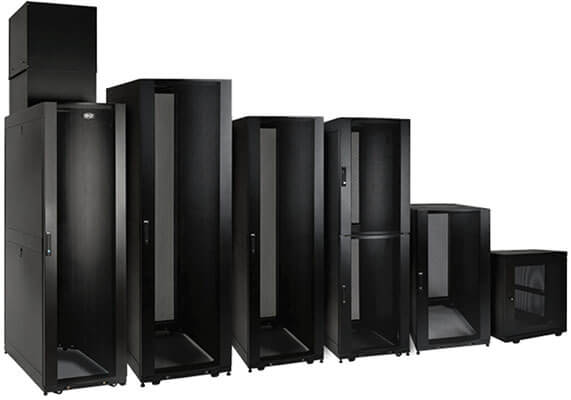
Features like quick-adjust mounting rails, modular side panels and toolless mounting slots for vertical PDUs and cable managers facilitate installation and configuration. Seamless compatibility with all EIA-standard 19-inch rack equipment ensures trouble-free
 |
Heavy-duty casters Casters can be a useful addition to a server rack, as they provide mobility and ease of movement. Casters allow you to easily move the server rack around the room to rearrange equipment or access cabling at the rear of the rack. They're also useful for temporary installations, such as trade shows, concert performances or exhibitions allowing you to easily transport the server rack and set it up quickly. When populating a rack with pre-installed casters, make sure it will roll through a standard 7-ft. (2.13 m) doorway if it needs to be moved to its final location. |
 |
Built-in grounding jumpers The grounding jumper typically connects the metallic parts of the server rack, such as the frame, doors, and side panels, to a grounding point, which could be a grounding busbar or a grounding electrode. The ANSI/TIA-942 standard for data center infrastructure includes a four-level rating for grounding. |
 |
Baying tabs Server rack baying tabs, also known as baying brackets or joining kits, are metal brackets or plates used to connect multiple server racks side-by-side. The center-to-center width of most baying tabs can be set at 600mm or 24" to match the width of standard data center floor tiles. |
 |
Square-hole vs. 12-24 threaded-hole mounting 12-24 threaded-hole mounting is an alternative method of attaching equipment to a server rack. It involves mounting equipment using threaded holes in the vertical mounting rails of the server rack. The holes are threaded with a 12-24 thread pattern, which means that they have 12 threads per inch and are compatible with 24-gauge screws. This method is less common than square-hole mounting but is sometimes used in specific types of server racks or with equipment that requires it. The choice between square-hole and 12-24 threaded-hole mounting will depend on the equipment and the type of rack used. Many racks support both methods, allowing for greater flexibility in configuring the equipment. |
 |
Cable management, such as cable managers and raceways, help to organize and route cables, which improves airflow and makes it easier to access and maintain equipment. |
 |
Cooling fans are used to improve airflow and reduce heat buildup in the server rack. They are available in various sizes and can be mounted on the rack or on individual equipment. |
 |
Shelves and drawers are used to provide additional storage space within the server rack. They can be used to store equipment manuals, tools and other accessories. |
 |
Rails and mounting hardware are used to secure equipment to the server rack. They are available in various sizes and configurations to accommodate different equipment types. |
 |
Monitor and keyboard trays are used to provide a convenient location for a monitor and keyboard within the server rack. They can be mounted on the front or rear of the rack. |
 |
Security accessories, such as door locks, camera mounts and tamper-evident seals are used to enhance the physical security of the server rack and protect equipment from theft or tampering. |
 |
Blanking panels, also known as blanking plates, are physical barriers that are placed in open spaces within server racks to fill gaps between installed equipment. They are designed to improve airflow and increase cooling efficiency in data centers and server rooms. |
 |
Grounding bars are typically made of copper or other conductive materials and are mounted on the back or side of the server rack. They are designed to be connected to the grounding system of the building or facility using a grounding wire or strap. |
 |
Gland plates are typically made of metal or plastic, and are placed on the top, bottom or sides of a server rack. They have pre-cut holes that are designed to accommodate cables of different sizes and are fitted with grommets to provide strain relief and prevent cable damage. |
 |
Colocation kits divide a server rack into separate compartments so a single rack can be shared by multiple companies. Kits are often provided by data center operators as part of their service offerings. |
 |
Security cages are typically made of heavy-duty steel mesh or perforated metal panels. They are designed to protect valuable and sensitive equipment stored in server racks from unauthorized access or theft. |
 |
Sensors are installed in a server rack to monitor environmental factors, such as temperature, humidity and airflow; and physical status such as door open/closed. |
|
Installs inside your rack enclosure to organize cabling and/or provide additional 0U mounting of PDUs and other devices and accessories with toolless mounting keyhole slots. |
|
Eliminates cable stress by organizing cabling across the top of your rack, neatly bundling it across an aisle or within a row of bayed racks. |
|
Securely conceals your network or other cabling, protects it from damage and keeps it neat and organized outside of walls. |
|
Prevents messy cable clutter by supporting and organizing cabling, while routing it from either side of the rack to interior connections. |
|
Cuts down on cable clutter and stressed connections by safely supporting and segregating the equipment cabling from either side of the rack to interior connections. |
|
Organizes and safely routes cabling across the top of a rack enclosure, creating a dedicated path that helps eliminate cable stress. |
|
Must-have accessory for keeping bundles of cables manageable. |
|
Hardware lets you mount cable ladders above your rack enclosures and extend them horizontally or vertically to maximize space. |
|
Recommended for setting up network or digital signage installations that require cabling to run along walls and ceilings, above drop ceilings or through inner duct systems for long distances. |
When selecting a server rack, it's important to consider these factors before making a decision:
Discover more in-depth purchase decisions in our server rack buying guide to ensure you're selecting the right rack for your specific needs.
| Network closet | Small & medium business data center | Large traditional data center | Colocation data center |
| <15 kW | 20 - 500 kW | 500 kW - 5MW | 1 MW - 20 MW |
• Gateway to the Internet or internal data center • Typical IT equipment like servers, UPSs, PDUs, switches/routers, patch panels |
• Networking, storage, Internet gateways are common requirements | • Risk adverse, highly redundant data centers • High availability • Security generally at the facility level • Focus on efficiency/power management |
• Unpredictable power and cooling needs due to multiple customers • Security is a key concern at the cabinet or pod level • Wide range of IT equipment requirements |
| 1 - 10 racks | 10 - 100 racks | 100+ racks | 100+ racks |
• Two- or four-post racks for closet environments (equipment weight is a key criteria for selection) • Wallmount enclosure for small installations (generally 12U or smaller) • Cable management to get cabling to rack |
• Small enclosures (12U to 36U) • Perforated doors to facilitate airflow • Supports power, backup and IT equipment needs • 42U and taller racks for larger offices and small data centers |
• 42U to 51U enclosures • Handle wide range of IT equipment including servers, storage and power • Compatibility with rack- and aisle-based containment often critical • Security is generally via a key lock • Cable management in, above and below rack is key |
• 42U to 51U enclosures • Unpredictable power and cooling needs due to multiple customers • Security a key concern at the cabinet or pod level • HFID locks often needed for access control • Compatibility with rack- and aisle-based containment often critical |
A rack unit (RU), also known as a "U", is a standard unit of measurement used in server racks and other IT equipment enclosures. One rack unit is equal to 1.75 inches (44.45 mm) in height.

The height of a piece of IT equipment is typically measured in rack units to determine how much space it will occupy in a server rack. For example, a UPS battery backup that is 3 rack units high would occupy 5.25 inches (133.35 mm) of vertical space in a server rack.
The use of rack units allows IT professionals to easily determine the amount of space needed to install and mount equipment in a server rack. It also helps ensure that equipment from different manufacturers can be easily interchanged or replaced without compatibility issues, as long as they adhere to the same standard.
The size of the server rack you need will depend on the specific requirements of your setup, including the number of servers and network devices you need to house, available space, and future growth plans. Here are some factors to consider when determining the size of server rack you need:
Once you have determined the number of devices and the space required, you can select a server rack with the appropriate height and number of rack units (RU). For example, if you need to house 10 servers, you may want to consider a 24RU server rack, which is typically 48 inches (121.92 cm) in height. Remember to take into account any additional accessories or add-ons you plan to use when selecting the size of the server rack you need.
Internal width: The standard internal width of a server rack is 19 inches (48.26 cm). This size is used for compatibility across different types of equipment. The width is measured between the inner edges of the two vertical rails that run the full height of the rack.
The 19-inch width is a standard that has been in use for many decades and is commonly referred to as the "EIA-310" standard. It was developed by the Electronics Industry Alliance (EIA) and has become widely adopted in the IT industry for mounting equipment such as servers, switches, and other networking hardware.
There are also wider server racks available, such as 23-inch and 24-inch models, that can accommodate larger equipment or provide more space for cable management. These wider racks are less common than the EIA-310 compliant 19-inch models and may be used in specialized applications or industries.
External width: The external width of a server rack can vary depending on the specific model and manufacturer, but most standard server racks have an external width of approximately 23.6 inches (600 mm) to 24 inches (610 mm).
750 mm (29.5 inches) racks are sometimes referred to as "wide racks". They are typically found in data centers where the additional space is used for cable management, power distribution, and other components, which can help improve airflow and reduce clutter.
The depth of a server rack can vary depending on the manufacturer and the specific model, but the most common depth for a server rack is between 36 and 42 inches (91.44 to 106.68 cm). The depth is measured from the front to the back of the rack and typically includes the space occupied by the equipment and any cabling.
It's important to choose a server rack with an appropriate depth to accommodate your equipment and any cabling required. You should measure the depth of your equipment and ensure that there is enough space in the server rack to accommodate it. A good rule of thumb is to allow at least 3-inches for cabling.
In addition to the standard depth, there are also shallower and deeper server racks available. Shallower racks, typically around 24 inches (60.96 cm) deep, are useful for networking gear in locations where space is limited, such as small offices or wiring closets. Deeper racks, typically around 48 inches (121.92 cm) deep, are useful for environments with larger equipment or for high-density server environments.
The weight of an empty server rack can vary depending on the specific model, the material it's made of, and the number and type of accessories installed. An extra-tall, heavy-duty rack like the Eaton SR55UB weighs in at 375 lbs. but in general, a standard 42U server rack made of steel can weigh between 150 and 250 pounds (68 to 113 kg) when empty. However, the weight can increase significantly when the rack is fully loaded with equipment.
It's important to consider the weight of the fully populated rack when determining the placement and installation. Check the maximum static weight capacity and ensure that your rack can support your setup. If you plan on moving or transporting the server rack (for example, if you plan on populating the rack at a center location, then shipping it to a branch office), you should also consider the maximum dynamic (rolling) weight capacity.
The amount of space that a server rack needs will depend on the specific model, the number of rack units (RU) it has, and the requirements of the equipment being housed. However, a typical 42U server rack, which is the standard height for most data center and enterprise implementations, requires about 24 to 32 square feet (2.2 to 3 square meters) of floor space.
It's important to ensure that the server rack has enough space to accommodate the equipment and any additional accessories or add-ons, as well as providing sufficient clearance for cable management, airflow, and maintenance. You should measure the available space and ensure that there is enough room to install the server rack with adequate clearance on all sides.
In addition to the floor space, it's also important to consider the vertical space when planning for a server rack. A 42U server rack, for example, is about 78 inches (198 cm) in height and requires enough clearance to be installed upright.
The height of a server rack is typically measured in rack units (RU), where one rack unit is equivalent to 1.75 inches (4.45 cm) in height. The most common height for a server rack is 42U, which is about 78 inches (198 cm) tall. However, server racks are also available in other heights, ranging from 2U to 58U or more.
When selecting a server rack, it's important to choose a height that is appropriate for your equipment and the available space. You should consider the number of devices you need to house and plan for additional capacity to accommodate future growth. It's also important to ensure that the rack can be installed in the available space and that there is enough clearance for proper airflow and maintenance.
In addition to the standard height of the server rack, it's also important to consider any additional height that may be added by accessories or add-ons, such as cooling fans or cable management systems. These accessories can add additional height to the rack and may need to be taken into account when planning for the overall height of the server rack.
Soundproofing a server rack is a good idea when the rack will be located in work areas, such as offices, recording studios, or residential areas.
The best solution is a soundproof enclosure. These enclosures are designed to reduce noise levels by isolating the IT equipment from the surrounding environment.
To reduce noise levels from an existing rack, install acoustic foam panels inside the server rack. Acoustic foam panels are designed to reduce sound reflections and can be cut to size to fit inside the server rack. Another option is to hang acoustic curtains around the server rack. These curtains are made of heavy-duty material and can be installed using grommets or other mounting hardware. Finally, sound dampening pads can be placed under the server rack to absorb vibration and reduce noise.
If noise is coming from cooling fans, use fan speed controllers and temperature sensors to regulate fan speed and ensure proper cooling.
You can approximate the heat produced by a server rack (and therefore its cooling needs) by calculating the total heat output of all the devices in the rack. Almost all the power consumed by IT devices is converted into heat, so a server that consumes 300W will have a thermal output of approximately 300W (multiply by 3.41 to convert watts to BTU/h).
If your rack includes a UPS, it's even easier. Use the power capacity of the UPS to estimate the cooling load. For example, if the UPS has an output capacity for 1,800 watts, assume the thermal output is 1,800 watts also.
The heat produced by a server rack can have a significant impact on the surrounding environment and can contribute to cooling costs and energy consumption. It's important to ensure that the rack is properly cooled, and airflow is optimized to prevent overheating and equipment failure.
It is important to ensure that all grounding connections are tight and bonded to metal rather than paint. This helps to ensure a low-resistance path for electrical currents.
To ensure compliance with the specific grounding standards and electrical codes applicable to your location, it's recommended to consult with a qualified electrician or an expert familiar with local regulations.
Grounding Options: Eaton Grounding Accessories
The choice between 2-post and 4-post open-frame racks depends on the specific requirements of your application. For lighter equipment or situations where space and budget are limiting factors, a 2-post rack might be a better choice. If you have heavier equipment and require more stability and flexibility in depth, consider a 4-post rack.
2-post open frame racks
Also known as relay racks, 2-post racks have two vertical posts to which equipment is mounted. The term "relay" comes from the telecommunications industry, referring to relay switches that were often mounted on these types of racks. In network closets, they are typically used for lightweight equipment, such as patch panels and network switches. Heavy devices, such as UPS systems and battery packs, are mounted at the bottom of the rack to provide added stability.
Advantages
Disadvantages
4-post open frame racks
Occasionally (and erroneously) referred to as 4-post relay racks, 4-post racks have four vertical mounting posts and are generally more robust than 2-post racks. They are designed to hold more and heavier equipment, such as servers, UPS systems and large network routers.
Advantages
Disadvantages
Moving a server rack can be a complex task due to the weight, fragility and importance of the equipment contained within it. Here is a general process for moving a server rack. Please note, this is a simplified process and actual procedures can vary based on the size of your server rack, the equipment in it, and the distance you're moving it.
| A | C | E | F |
|---|---|---|---|
All-metal frame
|
Cable management Cable routing Clear acrylic window Colocation |
Expansion rack Extra width rack
|
Front-to-rear airflow
|
| H | K | L | N |
Heat removal Hinged back |
Knockdown rack Racks ship fully assembled for easy installation. However, sometimes doorways or tight spaces cannot accommodate fully assembled racks, so knockdown models ship disassembled for easier transportation. |
Locking cabinet Rack locking cabinets secure and organize standard 19 in. rack equipment. They provide security for servers, routers, hubs, UPS systems and other essential network equipment. |
Network Equipment-Building System (NEBS) NEBS (Network Equipment-Building System) describes the environment of a typical United States RBOC Central Office. NEBS is the most common set of safety, spatial and environmental design guidelines applied to telecommunications equipment in the United States. It is an industry requirement, but not a legal requirement. |
| O | P | Q | R |
| Open-frame rack Expandable open-frame racks store 8U, 12U or 22U of 19-inch rack equipment up to 18 inches deep in locations with limited floor space where a locked enclosure is not required. Allows easy access to equipment and cabling. |
Patch-depth PCI and PCI DSS-compliant |
Quiet rack Racks specifically designed to minimize external acoustic levels caused by network equipment. Special foam sound-dampening baffles built into doors and side panels reduce acoustic levels by as much as 28 decibels. |
Rack depth Reversible front door Roll-through capability |
| S | T | V | W |
Seismic protection Shock pallet packaging
|
TAA-Compliant
|
Vented rack panel Vertical-mount rack Vertical mounting rail |
Wall-mount rack
|
We know you have many brands to choose from. On the surface, they may all seem alike. It's what you don't see that makes the difference. With Eaton, you get solid engineering, proven reliability and exceptional customer service. All our products undergo rigorous quality control before they are offered for sale, and independent testing agencies verify our products meet or exceed the latest safety and performance standards. Our commitment to quality allows us to back our products with industry-leading warranties and responsive customer service. It's the Eaton difference.

 MyEatonFAQs


